I'm looking forward to seeing you for your training soon. To help me prepare and to maximise the time on the day, I have a short list of advance tasks for you:
Complete a short survey. Please do this by the working day before the training date.
Download the course files.
Install an extra PowerPoint ribbon tab and configure the Quick Access Toolbar.
Install an extra Excel ribbon tab and configure the Quick Access Toolbar.
Download and install the free BrightSlide add-in.
Full instructions for each task are included below .
On the day, please bring your laptop with you.
In the meantime, if you have any issues or questions at all, please feel free contact me at steve@sharpn.co.uk.
Regards,

This is a very short questionnaire which will help me understand a little bit more about the training cohort. Please submit this by the day before the training at the latest. Thank you.
Or open the survey in a separate windowThere are various files that you'll need on the day:
A PDF handout, with the slides from the course plus additional notes.
A set of PowerPoint files to use in the various exercises we will do.
A set of Excel and PowerPoint files to use in the various exercises we will do.
A collection of miscellaneous tools and resources that I may refer to in the training.
To download the files:

This bit is optional, but I recommend it as it helps with productivity. If you are a Mac user, you can ignore this section as Office for Mac does not currently support importing ribbon layouts.
This step does two things.
⚠️Warning: if you are used to using the Undo and Redo buttons in the very top menu bar, this will remove them. That is deliberate. You will find it much quicker to learn the keyboard shortcuts for those instead: CTRL+Z and CTRL+Y (CMD+Z and CMD+Y on Mac). Please make a note of those or perhaps download my keyboard shortcuts guide.

To install the tab and QAT, expand the instructions below.
If you are installing in both the PowerPoint and Excel, make sure you are importing the right file in the right applications.

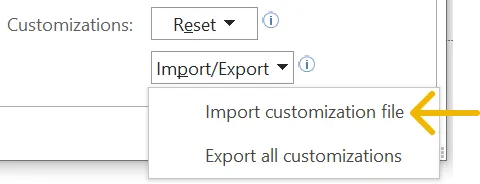
If you've already customised the ribbon or the toolbar you can back them up using the 'Export all customizations' option in step 4 before you install our settings.
At the moment, PowerPoint for Mac doesn't support importing customisations.
Download the relevant customisation zip file the at the link below, then follow these steps.

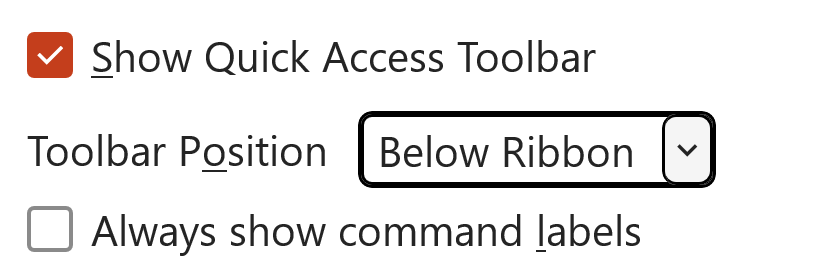
That's it! I look forward to seeing you at the training.